
I hope you all are enjoying GCC’s Week of Learning and Celebration! It’s one of my favorite weeks of every semester, and a big part of that is all the Faculty and Staff eager to get started and kick off the semester strong!
We have many workshops this week to help you refresh your skills, learn about tools available to you, and help you keep up with some of the updates over the Summer. Some (but not all) of these sessions will have a follow-up blog post for those who couldn’t attend the live session. Consider these the notes passed on when you missed the class; they’re pretty good, but nothing like the “real thing”.
As always, if you have any questions, please don’t hesitate to reach out to the CTLE; we’re here to help!
Happy Fall Y’all!
– Jessica
What’s New2U?
During our New2U session, we covered many of the updates and changes to Canvas, Google, SIS Faculty Center, Adobe, Turnitin, and Pressbooks (MODPress). While the list of changes is long (and exciting!), It’s nowhere near exhaustive. Consider these the Highlights and the things that you should go look at first!
Canvas
Canvas Studio
In April, Canvas introduced views for Canvas Studio Videos that enable different features to help students focus on what matters most. You can now select different views for videos.
Important: You will want to verify that anywhere you use Studio Quizzes in your course, they are set to Quiz view.
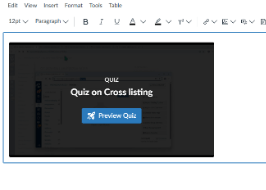
To learn more, you can check the CTLE Guide for Canvas Quiz View.
Enhanced Rubrics
Rubrics look a little different now. Enhanced rubrics are now the default and the classic legacy rubrics have been retired. When creating rubrics, you can now drag and reorder criterion, save drafts and even archive older rubrics. If you use rubrics in your course, just give them a quick glance to verify everything is as expected.
Your rubrics still contain the same information and operate similarly in SpeedGrader with some new layout options, they have some new bells and whistles to explore as well as a new layout.
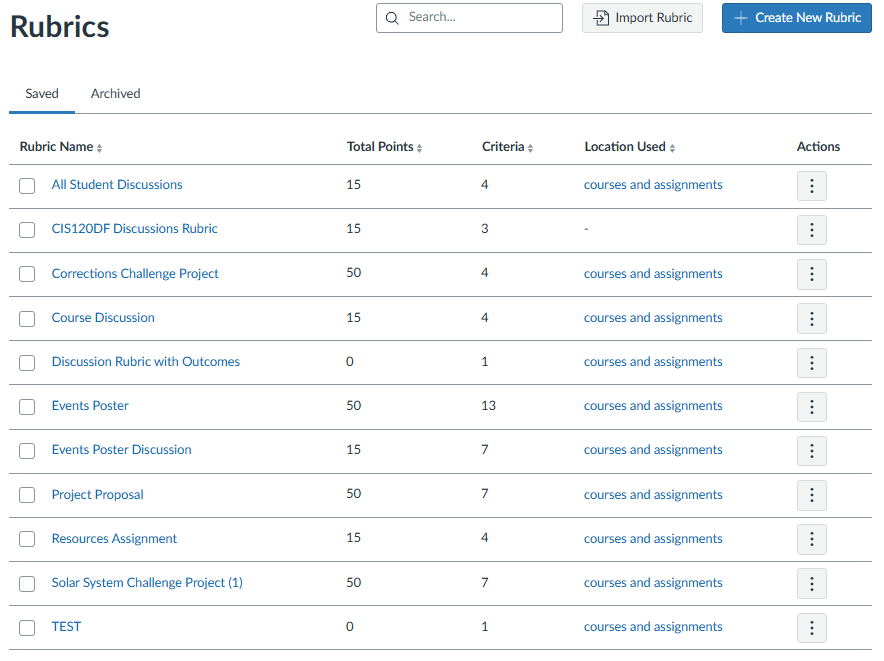
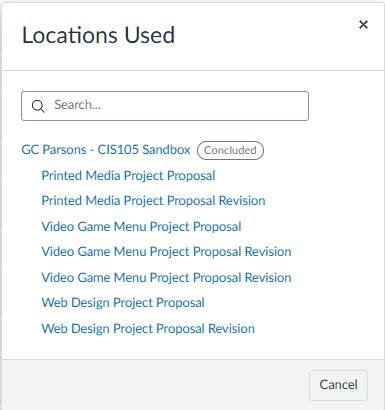
Figure 1 View of All Rubrics
Figure 2 New “Locations Used” Preview
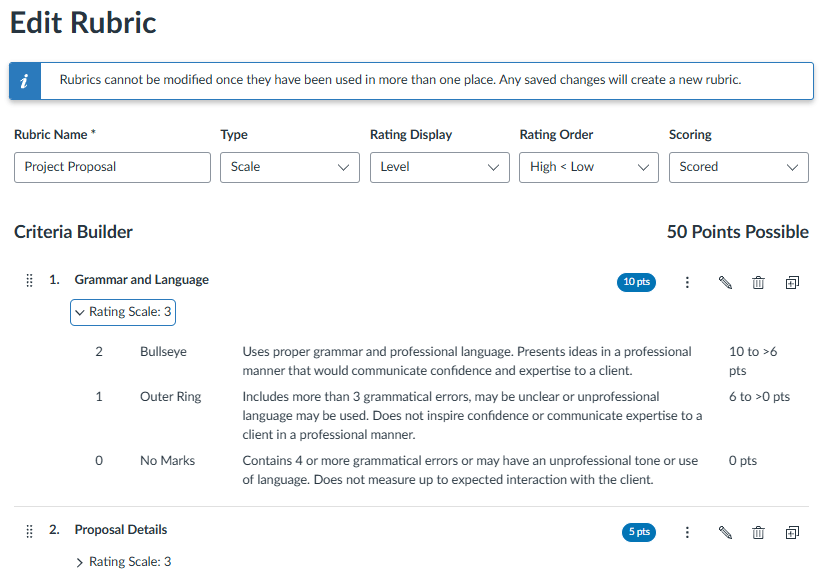
Figure 3 Edit Rubrics View
Learn more from Canvas’s Enhanced Rubrics Feature Overview and dive into some Enhanced Rubrics Tutorials.
SpeedGrader
The Upgraded Speed Grader experience is now permanent, and the legacy or “classic” version has been retired. This means Speedgrader looks a little different and has some new options, such as the ability to select rubric views, include images in your
If you’d like to learn more about what changed, we’ll have a Speedgrader Session this afternoon. It’s mostly the same, just a slightly different layout and a few features that have been added and rearranged.
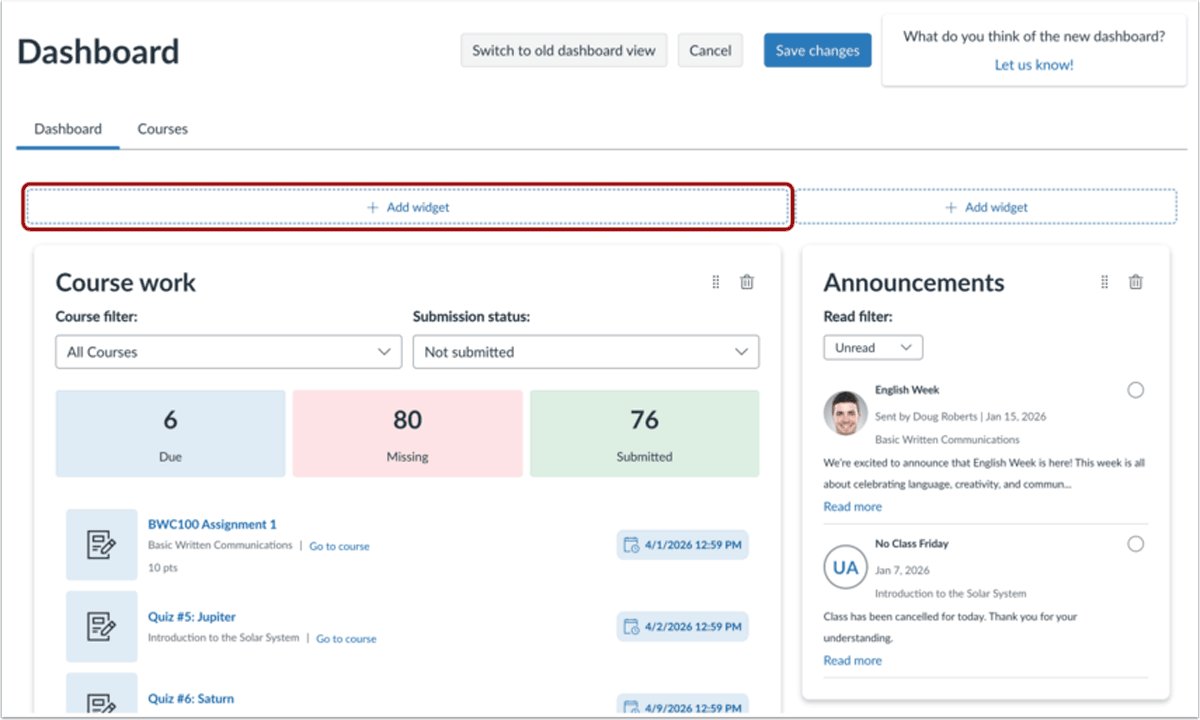
Customizable Student Dashboard
Canvas just launched their New Dashboard which gives students more flexibility in displaying the information that matters to them. You can learn more about the features of the new Student Dashboard from the Canvas Blog. If you’d like to learn how to turn on (or off) the New Dashboard from the Student Guide.
Student Notebook
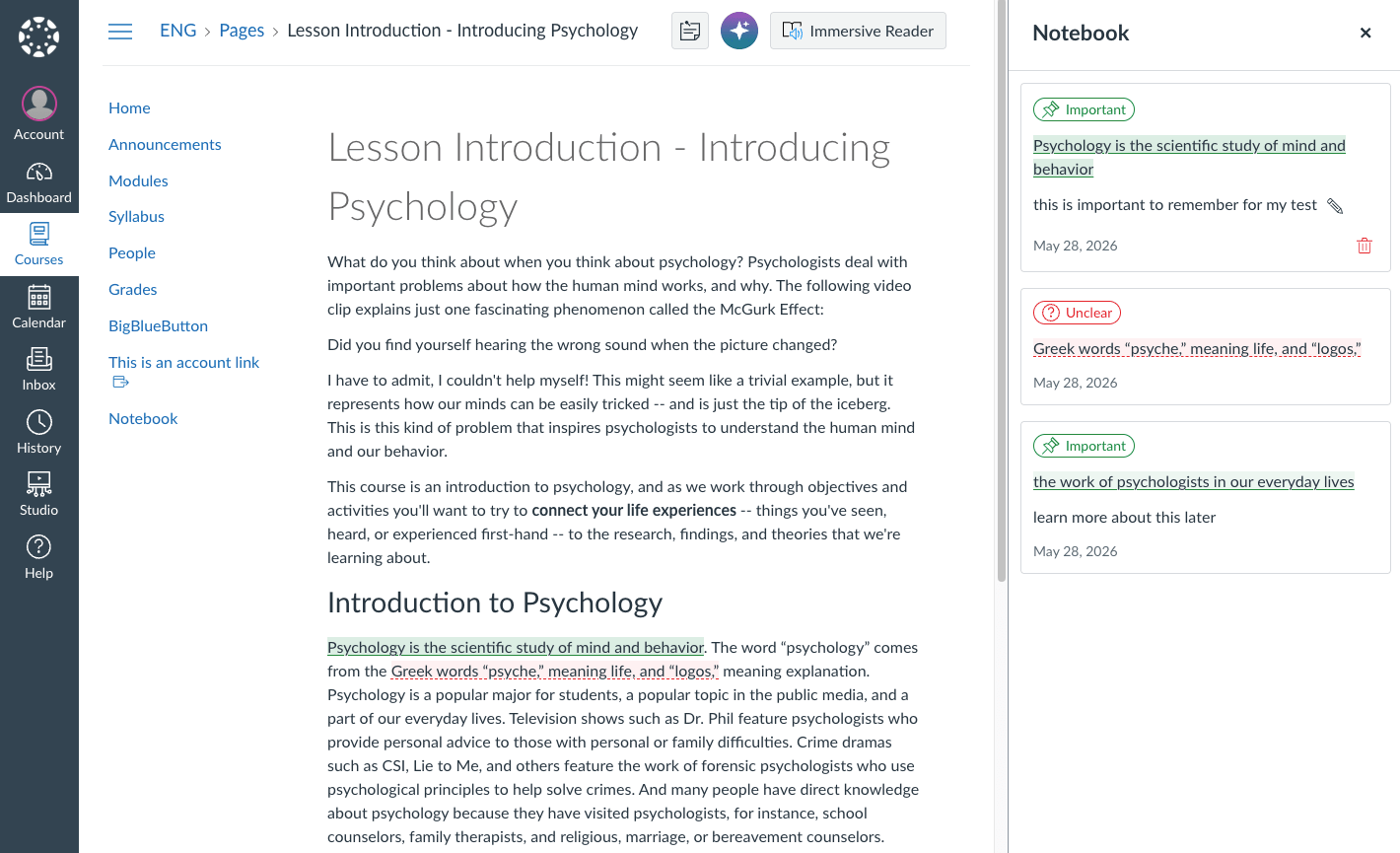
Canvas just launched their New Student Notebook, which helps students to track and gather information in a course, tag things they want to follow up on, etc. You can Learn how students can use the Notebook. Student highlights, flags and notes are private and cannot be seen by instructors. This feature is only available to course users with the student role. Teachers will not see this feature on their own navigation (but may see it in Student View).
NotebookLM now Gemini Notebook
Notebook LM is now Gemini Notebook. They’ve added some new features like slide deck which will build slides based on your uploaded content and a given prompt as well as an infographic builder.
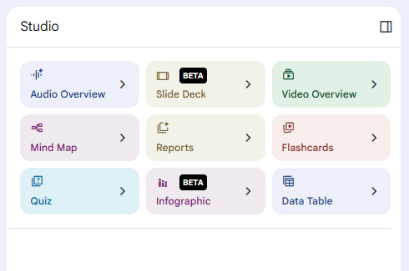
If you’d like to learn more about Gemini Notebook, Alisa Cooper will be hosting a session on Thursday afternoon. Students still don’t have access to NotebookLM through their Maricopa Accounts.
Gemini
Gemini came to us late spring, but is fully available to Faculty and Staff for use (students do not have access to Gemini). Note that not all features of the full version of Gemini are available to us, such as deleting old chats and some integration features.
Gemini can now reference your google drive and create files that live in your drive. To enable this integration, you’ll need to turn on “Smart Features in other Google Products”. In Gemini, click the settings icon and connected apps to learn more and enable these features. Key functions include:
- Ability to generate editable slides, spreadsheets, documents, etc in Gemini
- Workflows and automation through Google Workspace Studio
Note: Gemini’s system is independently hosted for Mariocopa, information entered is not used to train the larger model, but it’s important to still remember FERPA and privacy standards by not utilizing this or any other AI tool for sensitive or proprietary information.
SIS
Faculty Center Changes
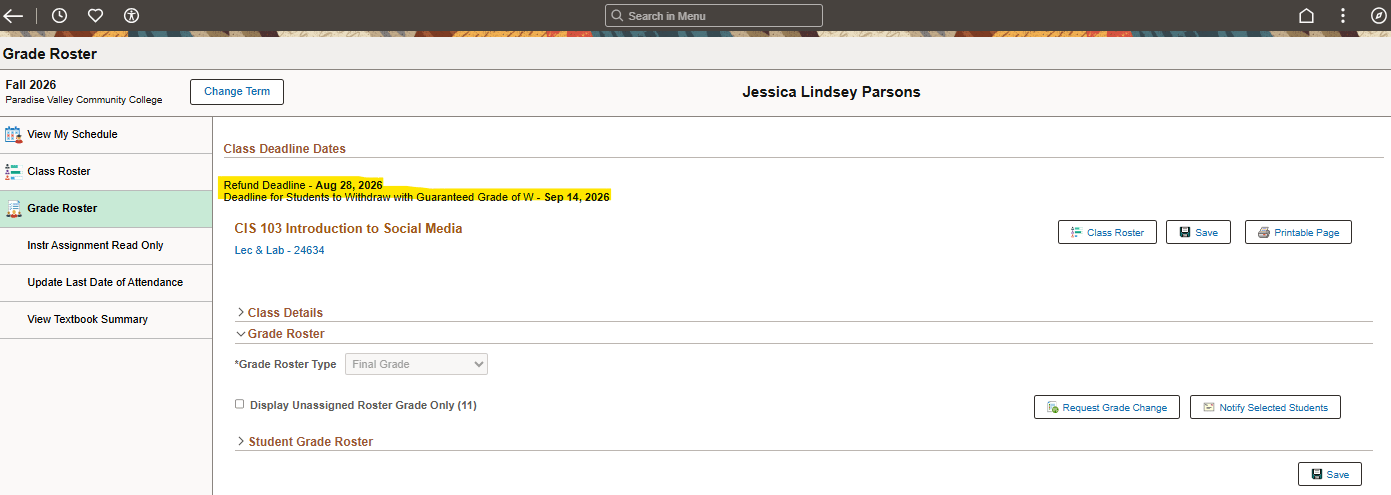
The faculty center received a new look and reorganization over the summer. You’ll likely find that some features are in different places.
For example, to access information about the Course Deadlines (withdrawal, refund, etc) you will find these under Faculty Center>Grade Roster in the upper left-hand corner.
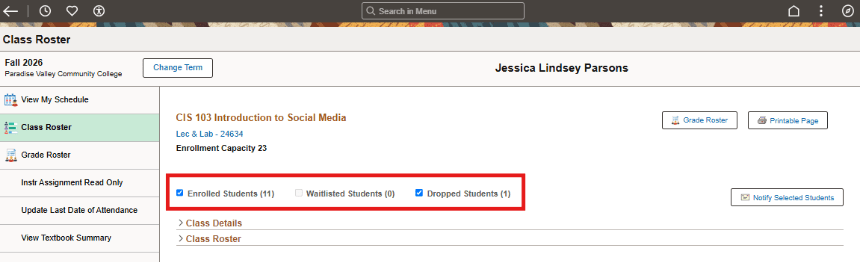
The Class Roster default view now includes Dropped and Waitlisted Students. Make sure to use checkboxes to refine your view to enrolled students if you’re using this feature for attendance on the first day of class.
Important! The default email for faculty profiles is now your MEID@maricopa.edu account. Please be sure you are checking this for student messages.
Review the District Comparison of the “Classic” (old) vs “Fluid” (new) SIS Faculty Center.
Adobe Acrobat
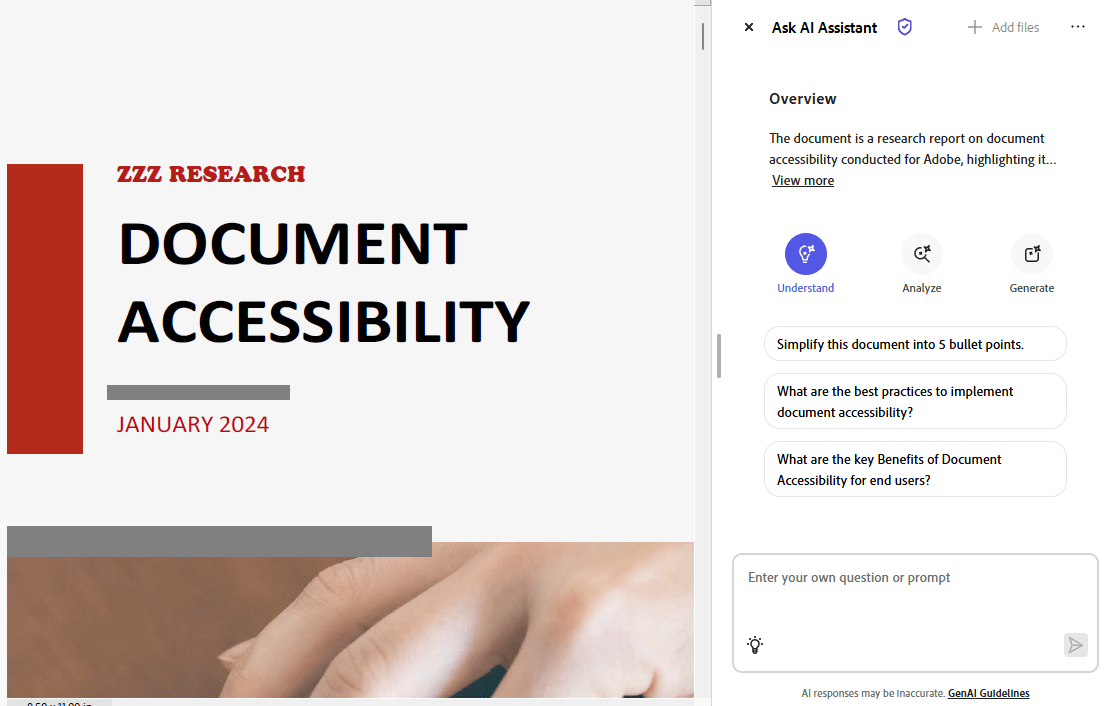
More AI integrations, including the ability to generate, understand and analyze a PDF document. A new AI assistant is available in the program to all users. This makes accessibility essential in documents so that the AI can detect information properly. This feature is available to all faculty, staff and students.
Turnitin
Made some noticeable updates including expanding accessibility features, evolving AI detection capabilities and reporting as well as updating the workflow for their systems. They’ve also added support for multi-part assignments.
Pressbooks
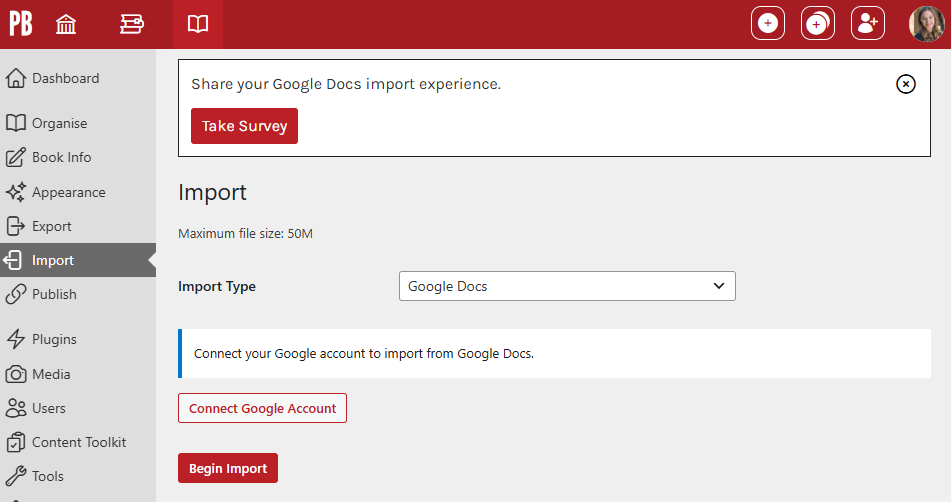
Google Docs Importer – You can now import your Google Docs directly into Pressbooks, including a Glossary of Terms. It’s important to know that this process is not compatible with the Document Tabs Feature (only the first tab will be imported).
Pressbooks now recommends deep linking when working with Canvas. This ensures H5P activities are more stable with the Canvas Gradebook.
Yuja Panorama
A new tool has appeared in Panorama, the Video Compliance Player. Upload your own Media or provide a link to a public video (unknown if this works for unlisted videos), and Yuja will automatically generate captions, audio descriptions, and provide chaptering. Use the Panorama course navigation feature to find the tool. Learn more from Yuja.
However, it’s important to note that this feature appears to be significantly limited. Users are provided with credits, 1 credit per minute of video. It appears users receive ~235 credits. It’s unknown if additional credits can be requested.

This feature was discovered on Sunday night and is currently being tested by the CTLE team, but we’re excited about the potential of this tool!
LastPass
On June 25, 2026 all GCC employees received an email from OIT about a new Password manager, LastPass. LastPass is a secure browser extension that stores and autofills your passwords, helping make sign-ins easier while improving account security. Please review this email and check your MEID@Maricopa.edu email address for an invitation.
Please note that the email informed all employees that “All browser-based password managers will be disabled on December 21, 2026.”. This means that users will not be able to access passwords stored in the browser from a college computer.
For questions, please reach out to the wonderful folks at OIT.
That’s All Folks!
While we’ve covered some of the biggest changes, you might notice a few other things have changed in your courses, plug-ins, and tools. It’s important to always review your course from the instructor’s and student’s view to make sure everything is working as expected.


